



Open the Feed, approve the emails, get on with your day.
Every morning the Feed shows new UK companies that match your agents, each with the first email written. You approve each one.
- 100 free leads, no card
- Nothing to cancel
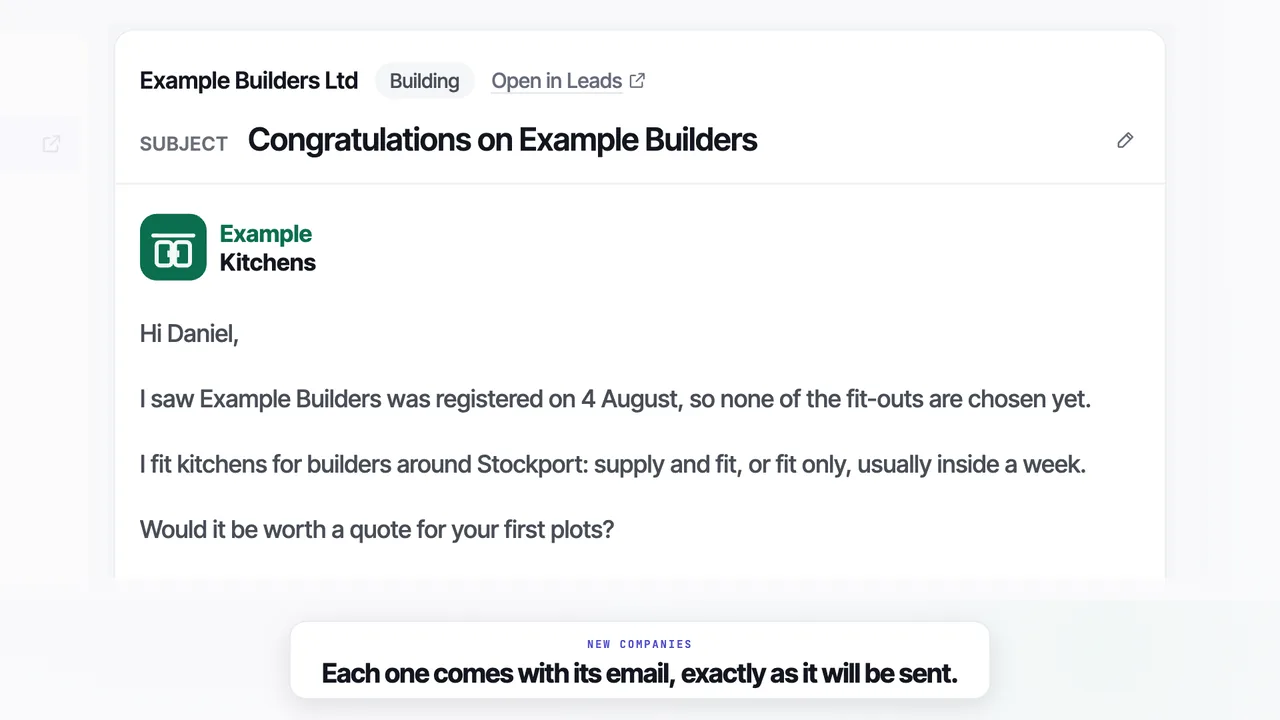
One email a company, ready to approve
Written for that company
The first line comes from a dated fact on the company's own record, so the email could not go to anyone else.
Change any line with a click
The Feed shows each email as it will be sent. Click a line to change it, or skip the company.
You stay in charge
Nothing sends until you approve it. Autopilot is optional and off by default.
Sends from your own mailbox
Connect Gmail or Microsoft 365 in one click, or another mailbox with a password. A new mailbox sends 5 a day at first, rising to 30.
What's new in Leadistry, September 2026
The Feed with Autopilot, the Desk and the Template, in a minute and a half. Music only.
Questions
01What time do new leads arrive?+
Agents look all day, so a new company reaches your Feed once it has been found and checked, with its email written.
02Can I edit the email?+
Yes. Click any line to change it, or ask the assistant. Approve and skip both give you 5 seconds to undo.
03What is Autopilot?+
An optional switch that sends your agents' emails from your own mailbox, in your sending hours. It is off by default.
04How many does it send a day?+
A new mailbox starts with 5 emails on its first day and adds 5 more each day it sends, up to 30 a day from day 6. You can change the most a day on Mailbox.
05What happens to the ones I skip?+
They are not emailed. They stay on Leads, still yours to use.
Your first leads arrive on your Feed with the emails written.