



Every reply in one place, with the answer drafted.
Your replies, results and next step on one screen. When a prospect replies, an answer is drafted. It never answers for you. You press send.
- 100 free leads, no card
- Nothing to cancel
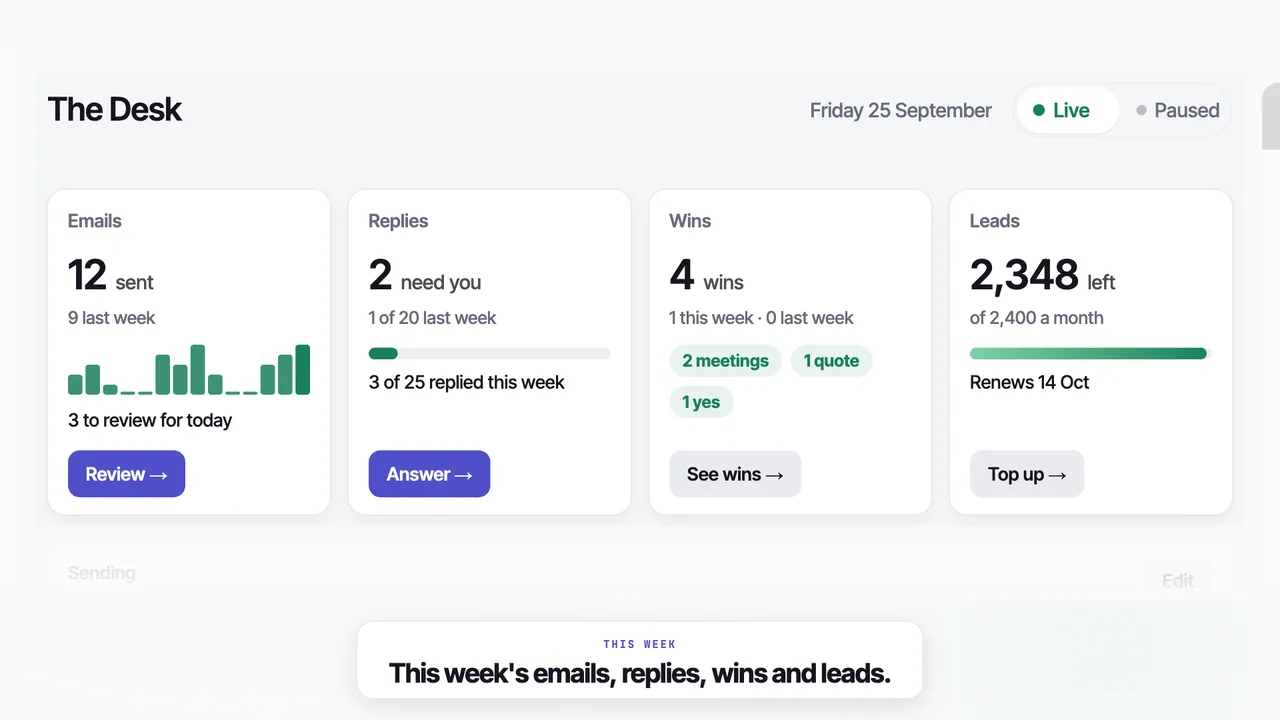
Replies, results and what to do next
Everything on one screen
This week's emails, the replies that need you, your wins and the leads you have left.
An answer drafted
Open a reply and an answer is already drafted. Read it, change it if you like, and press send.
An assistant when you ask
Ask in plain words to change an agent or edit an email. It asks you to confirm anything that sends or spends.
Run Leadistry from your own Claude
Connect your Claude account and it can read your Feed and replies and write your pitch. It asks before it approves anything.
What's new in Leadistry, September 2026
It opens on the Desk: this week's emails, replies, wins and the leads you have left. Music only.
Questions
01Does the Desk reply for me?+
No. Leadistry's Desk drafts an answer to each reply, and you read it and press send.
02Where do replies come from?+
From the mailbox you sent from. A reply lands in your own inbox and on the Desk, and it stops that company's follow-ups.
03What does the assistant change?+
Ask it in plain words to change an agent, edit an email or answer a question about your leads. It asks you to confirm anything that sends or spends.
04How do I mark a win?+
Open the reply and mark it as a meeting, a quote or a yes. Wins are counted by type, never in pounds.
05Does asking the assistant use my leads?+
No. Only a company delivered to you counts as a lead. If a suggestion would cost you, it says how much first.
Replies to your emails land on your Desk with an answer drafted.